
An AI interview copilot is an app that runs during an online interview. It transcribes what the interviewer asks and suggests answer points, usually drawing on your resume and the job description. Most copilots can also read a coding problem from a screenshot, and they keep a transcript so you can go over the interview afterward.
The idea is simple. What separates the useful ones from the rest is speed, how well they use your own background, and what they cost when you only have a few interviews. This guide uses YesToTheOffer, which we make, to show how a copilot works step by step, then covers what to compare before you choose one.
Try an AI interview copilot with 30 free minutes
Desktop app for Mac and Windows. Pay per minute, no subscription.
What happens before the interview
Most of the value comes from setup. A copilot that knows nothing about you can only give the generic answer anyone could find online.
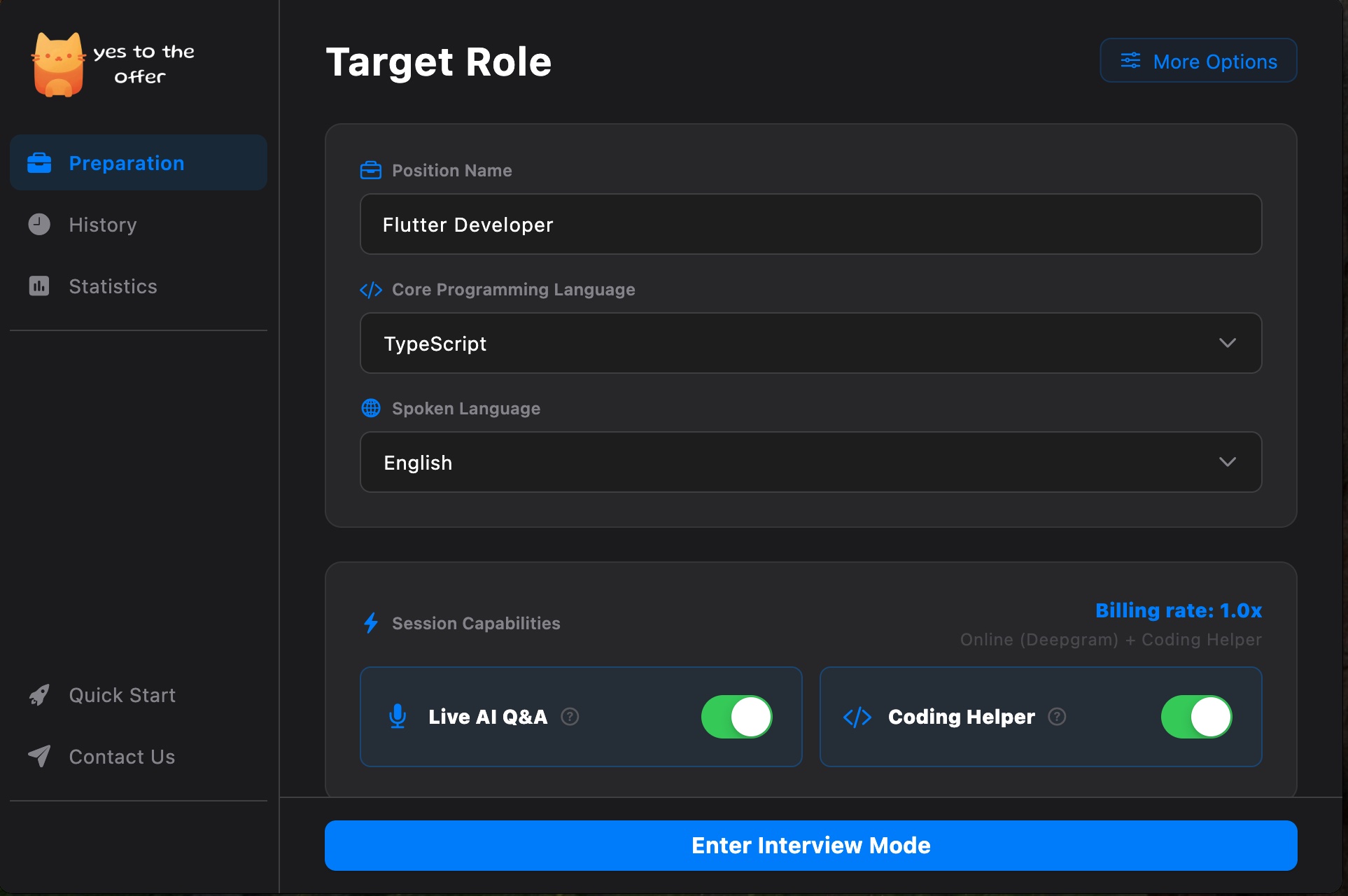
In YesToTheOffer you create a profile for the role: the position name, the company if you know it, and the job description. If you don't have a job description, the app drafts one for you to edit. You then link your resume and, if you like, add documents to a knowledge base, such as notes on past projects or the STAR stories you've prepared. On the desktop app all of this stays on your computer.
The last step is choosing what to turn on for the session. Live Q&A listens to the interview and suggests answers. Coding Helper works from screenshots. You also pick the language you'll be speaking and the programming language you'll code in.
What happens during the interview
Once the interview starts, the copilot listens to two audio sources: your microphone and your computer's audio output, which is where the interviewer's voice comes from. YesToTheOffer streams both to Deepgram for speech-to-text and doesn't store the audio.
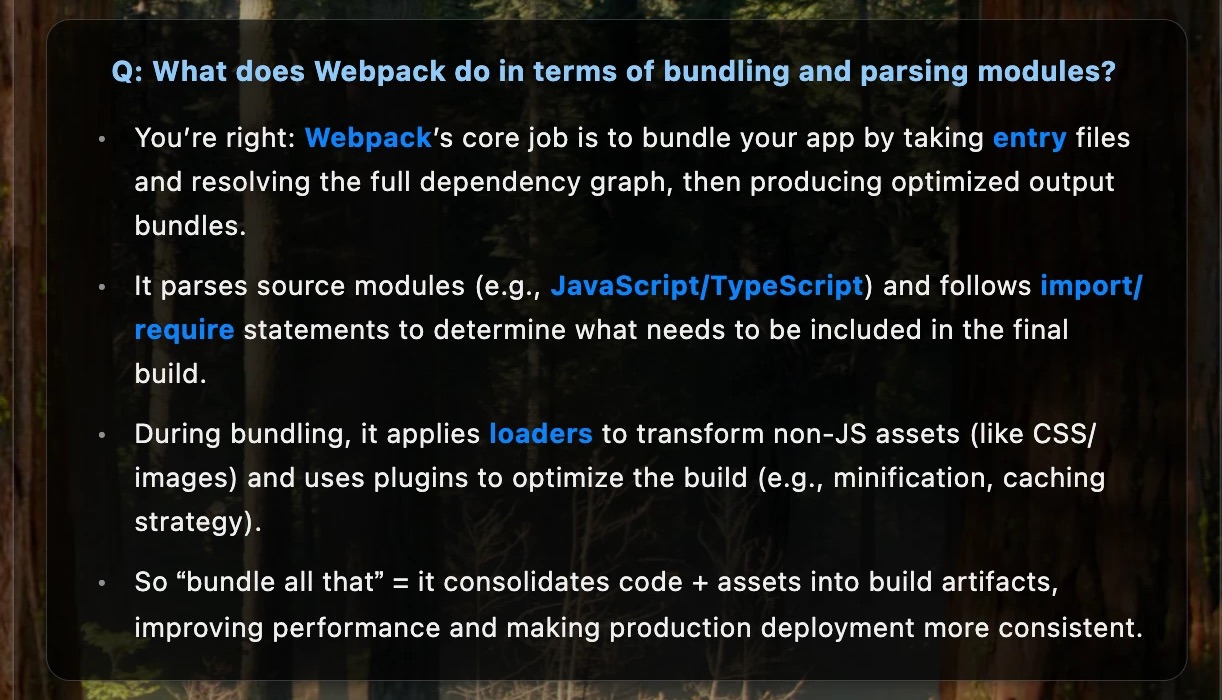
When the interviewer finishes a question, it appears at the top of a small window with a few answer points under it. In the example below, the interviewer asked what Webpack does with bundling and modules, and the suggestions cover entry files, the dependency graph, loaders, and plugins. Points like these are meant to remind you what to cover. Read out word for word, they would sound scripted.
Coding rounds work differently. Instead of listening, you capture a screenshot of the problem, and the copilot returns an approach and code in the language you picked.
The window is controlled with keyboard shortcuts so you don't have to click around mid-interview. On a Mac, Cmd+Shift+\ shows or hides it, Cmd+Shift with the arrow keys moves and scrolls it, and Cmd+Shift+Esc ends the session. Windows uses Ctrl+Shift instead, and ends the session with Ctrl+Shift+Q.
What happens after the interview
This is the part people skip, and it's often the most useful. YesToTheOffer saves the full transcript with the AI's answers and any screenshots, then writes a review of the interview. Reading what you were actually asked, next to what you said, is a quicker way to improve than another round of generic practice questions. We go deeper on this in interview transcription and review.
Copilot, mock interview, or question bank?
These three get lumped together, but they help at different moments.
| Tool type | When you use it | What it gives you |
|---|---|---|
| AI interview copilot | During a real interview, and when reviewing it afterward | Transcribed questions, answer points from your resume, coding help |
| Mock interview tool | Before the interview, to practice | An AI interviewer that asks questions and scores your answers |
| Question bank | Before the interview, to study | Lists of common questions with sample answers |
Some products bundle more than one. Final Round AI, for example, pairs its live copilot with practice interviews in eight scenarios.
What to compare before you pay
Start with how the tool charges, because the gap is large. As of October 5, 2026, YesToTheOffer sells minutes with no subscription: $29.99 for 240 minutes, $59.99 for 600, or $99.99 for 1,200, and the minutes don't expire. LockedIn AI's unlimited plan is $54.99 a month. Parakeet AI's unlimited plan is $149.90 a month, or you can buy credits where half a credit covers a 30-minute session. If you have four or five interviews in total, a subscription can cost more than you'd ever use. If you're interviewing every week for months, unlimited plans start to make sense. Our Cluely alternatives comparison has the full price table.
After price, look at how the tool uses context. Can you add your resume and the job description? Can you add your own notes? Answers built from your real projects are the main reason to use a copilot at all.
Check coding support next if you're a developer. Screenshot-based help should be part of the plan you buy. In YesToTheOffer a coding-only session uses minutes at 0.2x, so 240 minutes covers up to 1,200 minutes of screenshot help.
Finally, check where your data goes. With YesToTheOffer's desktop app, your job profiles, resumes, knowledge base, and interview history are stored on your computer, while audio is sent to Deepgram and text to AI model providers through OpenRouter to generate answers. Whichever tool you pick, read its privacy policy before you upload a resume.
Reviews of the main tools
If you're comparing specific products, we've checked each one's own site for prices and features:
- Final Round AI review: subscription with practice interviews and live help
- LockedIn AI review: unlimited plans and mobile apps
- Parakeet AI review: credits or an unlimited subscription
- Sensei AI review: free sessions, $89 monthly or $24 a month billed yearly
- Interview Sidekick review: a large question bank and unlimited mock interviews
- Huddlemate review: pay per hour of active use
- Cluely review: a meeting assistant
- Interview Coder alternatives
Each review compares the tool with YesToTheOffer, which is billed per minute with no subscription.
Use it the way the employer allows
Employers set their own rules about AI tools, and they differ. Read the instructions you receive. Where an assistant isn't allowed, use it before and after instead: set up your profile and stories, rehearse against a recorded interview, and review the transcript of your real interview once it's over. If you're preparing for a specific kind of round, see our guides to coding interview assistants and behavioral interviews with AI.
Set up your first interview profile
Add your resume and the job description, then try live answers and coding help with 30 free minutes.